Best Podcast Recording Tips for Beginners

You've got a brilliant idea for a podcast, and the world is ready to hear it. But turning that vision into high-quality audio can seem like a daunting technical challenge, especially when you're just starting out. Don't let initial hurdles dim your creative spark! This article provides essential podcast recording tips for beginners, designed to help you capture clear, engaging sound without the overwhelm. Prepare to elevate your audio game and confidently launch your voice into the digital soundscape.
Podcast Recording Tips for Beginners: Your Essential Guide to Sound Success
Embarking on the journey of starting a podcast is incredibly exciting. You have unique stories and valuable insights to share. However, many new podcasters quickly discover that achieving excellent sound can be a challenge. Poor audio quality for podcasts is a common reason listeners tune out. It directly impacts listener retention and overall engagement. Your message deserves to be heard clearly.
This guide is designed to empower you from day one. We provide practical, actionable podcast recording tips for beginners. You will learn simple techniques to capture crisp, professional-sounding audio. No jargon, just straightforward advice. Master these fundamentals and elevate your podcast's impact. Start strong and build a loyal audience with superior sound.
Essential Podcast Recording Tips for Beginners to Master Your Sound
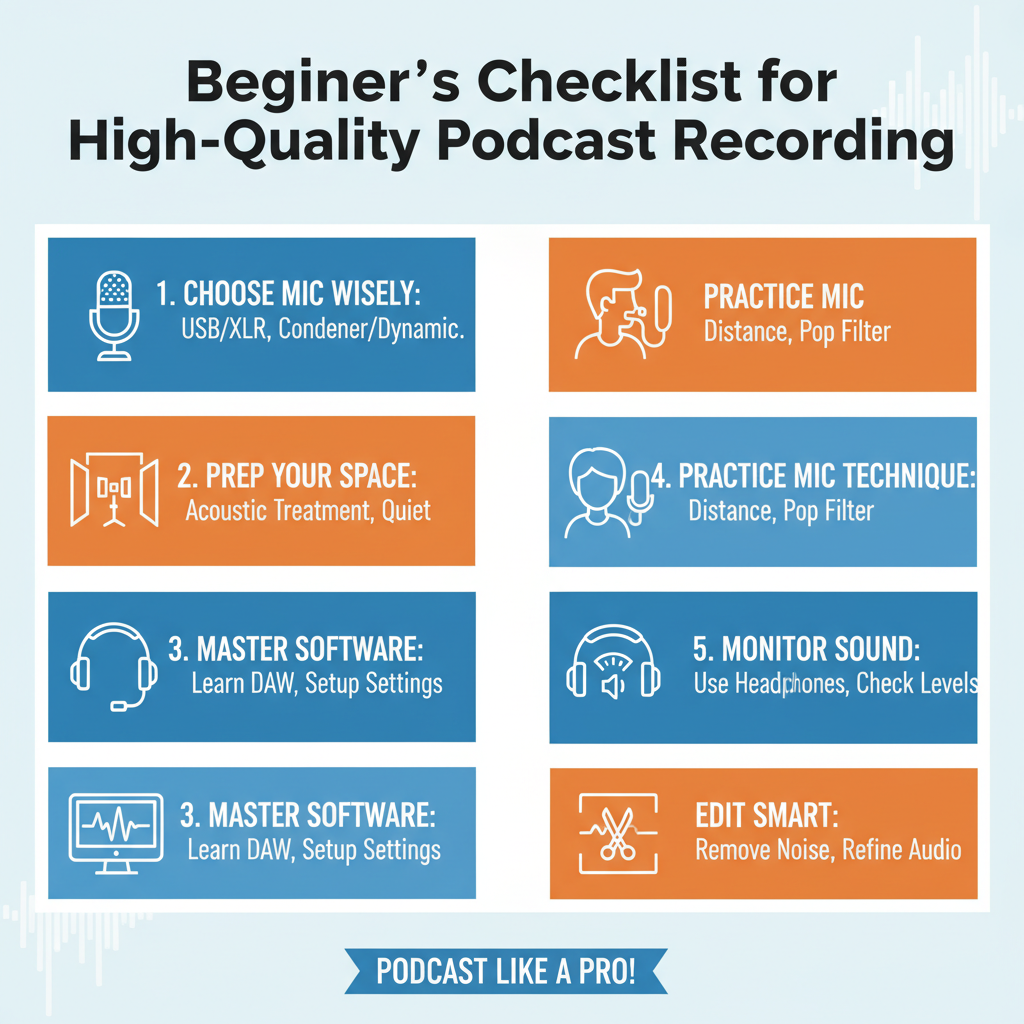
- For your beginner podcast setup, consider a USB microphone like the Blue Yeti for simplicity, or an XLR dynamic mic (e.g., Shure SM58) paired with an audio interface for better future scalability. Dynamic mics are great for untreated rooms, minimizing background noise and boosting your podcast sound quality without complex gear.
- Improve your audio recording for podcasts by choosing a small room with soft furnishings. Blankets, pillows, and even clothes can absorb sound, reducing echo. Record in a closet or near a bookshelf for surprisingly effective acoustic treatment without needing expensive soundproofing, significantly enhancing your sound quality.
- Start your beginner podcast setup with free DAWs like Audacity or GarageBand. These are excellent for learning basic audio recording and editing. Ensure your microphone is selected as the input device and set your sample rate to 44.1 kHz for standard podcast sound quality. Practice recording short segments.
- Master your podcast sound quality by maintaining consistent mic proximity (about 6-12 inches). Use a pop filter to prevent harsh 'p' and 'b' sounds (plosives). Set your gain so your audio peaks around -12 dB to -6 dB, avoiding distortion while ensuring a strong, clear signal for listeners.
- Always use headphones during audio recording for podcasts. This allows you to catch background noise, hums, or mic issues in real-time. Critically listen to your voice for clarity and consistency. Monitoring prevents you from discovering major sound quality problems only after the recording is complete, saving editing time.
- Enhance your podcast sound quality with basic editing. Remove long pauses, 'ums,' and 'ahs.' Apply gentle noise reduction if needed, but avoid overdoing it. Use a compressor to level out volume differences and ensure your entire episode has a consistent loudness, making it pleasant to listen to.
- Consistency is key for a professional beginner podcast setup. Try to record in the same space with similar settings each time for uniform podcast sound quality. Establish a regular recording and publishing schedule to build listener anticipation and habit, fostering growth for your show.
- Never underestimate the importance of backing up your audio recording for podcasts. After each session, save your raw audio files to a cloud service (e.g., Google Drive, Dropbox) and an external hard drive. This safeguards your hard work against accidental deletion or computer failure, protecting your valuable content.
Comparing Beginner Podcast Recording Setups: DIY Home vs. Professional Studio
| Aspect | DIY Home Setup (Beginner Home Podcast Studio) | Professional Studio (e.g., Ascendant.living - Professional Podcast Studio) |
|---|---|---|
| Microphone Quality | Often relies on basic USB microphones, which are convenient but can limit overall podcast quality and sound fidelity for your initial podcast recording equipment. | Features broadcast-grade XLR microphones and premium podcast recording equipment, ensuring crystal-clear audio and superior sound capture for any podcast quality comparison. |
| Acoustics | Untreated rooms present challenges like echo, reverb, and external noise, requiring DIY soundproofing efforts that often fall short of professional standards. | A dedicated, sound-treated studio environment eliminates unwanted reflections and noise, providing optimal acoustics for pristine audio recordings. |
| Equipment Cost | Involves an initial investment in basic gear (mic, headphones, interface) and ongoing costs for upgrades, which can quickly accumulate. | Access high-end gear through a simple rental or service fee (view pricing), avoiding large upfront investments in expensive podcast recording equipment. |
| Technical Expertise | Requires self-learning audio engineering basics, software operation, and troubleshooting, demanding significant time and effort. | Benefit from on-site audio engineers and technical support who handle all setup and monitoring, ensuring flawless recordings. |
| Video Production | Limited to basic webcam integration and simple lighting, making it difficult to achieve a professional visual aesthetic for video podcasts. | Offers multi-camera 4K setups, professional lighting, and seamless video switching for high-quality, engaging video podcast production. |
| Time/Effort | Consumes valuable time on setup, learning curves, and post-production tasks like editing, diverting focus from content creation. | Allows you to focus purely on content creation and delivery, with technical aspects and post-production handled by experts. Book your session to maximize your efficiency. |
Elevate Your Podcast: Next Steps Beyond Beginner Recording Tips
Having mastered essential podcast recording tips for beginners, you understand consistent audio quality is paramount for listener engagement. While DIY is a great start, scaling up demands more. Professional studios offer unparalleled quality, advanced equipment, and expert support, saving time and ensuring a polished final product.
For creators, founders, and brands in Jaipur ready to achieve broadcast-quality results, Ascendant.living is your premium professional podcast studio Jaipur. We provide the environment and expertise to truly elevate your content, ensuring every episode meets high standards. Explore our offerings and book your session to transform your podcast.
Podcast studio · Pratap Nagar, Jaipur
Book the studio for your next episode
Multi-cam setup, pro mics and acoustic treatment. Walk in, hit record, walk out with your episode.
- From ₹1,200/hour
- 2-hour minimum
- Editing & reels add-ons